-
-
-
-
-
-
Network Service and Software Information
-
Application for Scanning Documents and Images (Epson Scan 2)
-
Application for Configuring Scanning Operations from the Control Panel (Epson Event Manager)
-
Application for Configuring Fax Operations and Sending Faxes (FAX Utility)
-
Application for Quick and Fun Printing from a Computer (Epson Photo+)
-
Application for Easily Operating the Printer from a Smart device (Epson Smart Panel)
-
Application for Updating Software and Firmware (EPSON Software Updater)
-
Application for Setting up the Device on a Network (EpsonNet Config)
-
-
-
Checking and Cleaning the Print Head - Control Panel
-
Load A4-size plain paper in the printer.
-
Select Maintenance on the home screen.
To select an item, use the


 buttons, and then press the
OK button.
buttons, and then press the
OK button.
-
Select Nozzle Check.
-
Follow the on-screen instructions to print the nozzle check pattern.
-
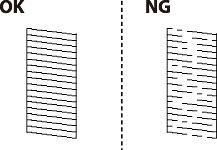
Examine the printed pattern.
-
If you cannot see any broken lines or missing segments as in the following "OK" pattern, the nozzles are not clogged. Select No to close the nozzle check feature. No further steps are necessary.
-
If there are broken lines or missing segments as shown in the "NG" pattern, the print head nozzles may be clogged. Go to the next step.
-
-
Select Yes, and then follow the on-screen instructions to clean the print head.
-
When cleaning is finished, print the nozzle check pattern again. Repeat cleaning and printing the pattern until all lines are printed completely.
