Language
Epson

TM-m10

User's Manual

Epson

TM-m10

User's Manual

Before Using the Printer

Important Safety InformationProduct Information PageChecking Items Included with the Printer

Part Names

Part Names

Setup

Checking/Changing the Installation DirectionConnecting CablesConnecting Smart DevicesAttaching the Power Switch Cover

Basic Operations

Turning the Power On/OffRemoving/Attaching the Covers (Rear and Bottom)Feeding the Roll PaperInstalling or Replacing the Roll Paper

Cleaning

Cleaning the Printer CaseCleaning the Thermal Head and the Platen Roller

Troubleshooting

Cannot PrintLED Panel Lights are On/Flashing/OffWhen the Roll Paper JamsThe Roll Paper Cover Does not Open

Appendix

SpecificationsRestriction of UseCAUTIONSTrademarks

Top > Troubleshooting > When the Roll Paper Jams

When the Roll Paper Jams

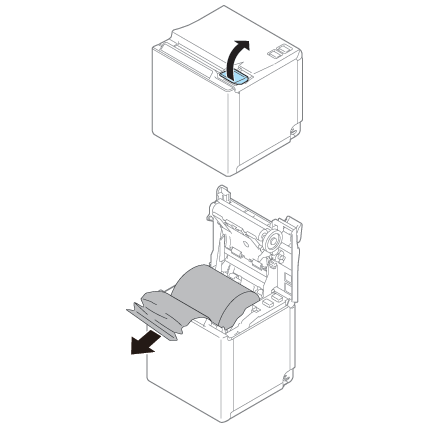
When a paper jam occurs, never pull out the paper with too much force. Open the roll paper cover and remove the jammed paper.

CAUTION:
Do not touch the thermal head and its surroundings. After printing, the thermal head and its surroundings can be very hot.
  • Back
  • Top
  • Next

Before Using the Printer

Important Safety InformationProduct Information PageChecking Items Included with the Printer

Part Names

Part Names

Setup

Checking/Changing the Installation DirectionConnecting CablesConnecting Smart DevicesAttaching the Power Switch Cover

Basic Operations

Turning the Power On/OffRemoving/Attaching the Covers (Rear and Bottom)Feeding the Roll PaperInstalling or Replacing the Roll Paper

Cleaning

Cleaning the Printer CaseCleaning the Thermal Head and the Platen Roller

Troubleshooting

Cannot PrintLED Panel Lights are On/Flashing/OffWhen the Roll Paper JamsThe Roll Paper Cover Does not Open

Appendix

SpecificationsRestriction of UseCAUTIONSTrademarks

Top > Troubleshooting > When the Roll Paper Jams

When the Roll Paper Jams

When a paper jam occurs, never pull out the paper with too much force. Open the roll paper cover and remove the jammed paper.

CAUTION:
Do not touch the thermal head and its surroundings. After printing, the thermal head and its surroundings can be very hot.

  • Back
  • Top
  • Next

©Seiko Epson Corporation 2015-2019 (M00092007 EN)

Language selection

  • English
  • Français
  • Deutsch
  • Nederlands
  • Italiano
  • Español
  • Português
  • Türkçe
  • Ελληνικά
  • Slovenščina
  • Hrvatski
  • Dansk
  • Suomi
  • Norsk
  • Svenska
  • Polski
  • Česky
  • Magyar
  • Slovenčina
  • Română
  • Български
  • Latviešu
  • Lietuvių
  • Eesti
  • Русский
  • Қазақ
  • العربية
  • Bahasa Indonesia
  • ภาษาไทย
  • Tiếng Việt
  • 繁體中文
  • 日本語