
Before Using the Printer
Product Models and Supported Interfaces
Part Names
Setup
Basic Operations
Cleaning
Troubleshooting
Appendix
Top > Setup > Changing the Paper Width
Changing the Paper Width
You can change the paper width from 80 to 58 mm by installing the included 58-mm width roll paper guides. Follow the steps below to change the paper width.
 CAUTION:
Turn off the printer when installing the roll paper guides.
-
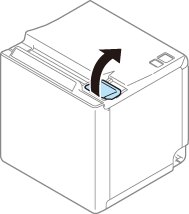
Open the roll paper cover.
-
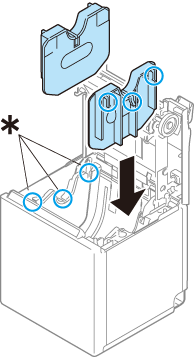
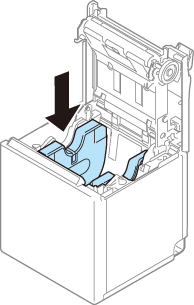
Align the three projections on the roll paper guides with the rectangular holes (*) in the printer, and then press them down.
-
Set the paper width in software setting mode. For details, see the Technical Reference Guide.
 CAUTION:
-
If you remove the roll paper guide to use 80 mm width paper after changing the paper width setting, make sure to change the setting again. For details, see the Technical Reference Guide.
-
After using the printer for an extended period at 58 mm, do not return to 80 mm. Parts of the print head that do not normally touch the paper may be damaged by the platen roller, and the autocutter may wear out.
Before Using the Printer
Product Models and Supported Interfaces
Part Names
Setup
Basic Operations
Cleaning
Troubleshooting
Appendix
Top > Setup > Changing the Paper Width
Changing the Paper Width
You can change the paper width from 80 to 58 mm by installing the included 58-mm width roll paper guides. Follow the steps below to change the paper width.
CAUTION:Turn off the printer when installing the roll paper guides.
-
Open the roll paper cover.
-
Align the three projections on the roll paper guides with the rectangular holes (*) in the printer, and then press them down.
-
Set the paper width in software setting mode. For details, see the Technical Reference Guide.
CAUTION:-
If you remove the roll paper guide to use 80 mm width paper after changing the paper width setting, make sure to change the setting again. For details, see the Technical Reference Guide.
-
After using the printer for an extended period at 58 mm, do not return to 80 mm. Parts of the print head that do not normally touch the paper may be damaged by the platen roller, and the autocutter may wear out.