Language
Epson

TM-P80II Auto Cutter Model

User's Manual

Epson

TM-P80II Auto Cutter Model

User's Manual

Troubleshoot
Troubleshooting

Before Using the Printer

Important Safety InformationManuals for This ProductProduct Information PageChecking Items Included with the Printer

Part Names

BodyOperation panel

Basic Operations

Placing or Hanging the PrinterInstalling the BatteryCharging the BatteryTurning the Power On/OffOpening/Closing the Roll Paper CoverInstalling or Replacing the Roll PaperAnti-Curl Function

Setup

Connecting to Smart DevicesConnecting to Computers

Cleaning

Cleaning the Printer CaseCleaning the Thermal HeadCleaning the Platen Roller and Paper Detector

Troubleshooting

QR Code LabelMeanings of LED IndicationsWhen the Roll Paper JamsWhen the Roll Paper Cover does Not OpenPrintout is FaintCannot Print

Product Specifications

Product SpecificationsConsumables and Options

Appendix

Restriction of UseCAUTIONSTrademarks

Top > Basic Operations > Turning the Power On/Off

Turning the Power On/Off

Turning the Power On

Press the power button for about one second and release it when the power LED lights up.
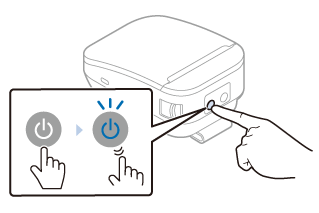
Turning the Power Off

Press the power button for about two seconds and release it when the power LED goes off or starts flashing.

  • Back
  • Top
  • Next
Troubleshoot
Troubleshooting

Before Using the Printer

Important Safety InformationManuals for This ProductProduct Information PageChecking Items Included with the Printer

Part Names

BodyOperation panel

Basic Operations

Placing or Hanging the PrinterInstalling the BatteryCharging the BatteryTurning the Power On/OffOpening/Closing the Roll Paper CoverInstalling or Replacing the Roll PaperAnti-Curl Function

Setup

Connecting to Smart DevicesConnecting to Computers

Cleaning

Cleaning the Printer CaseCleaning the Thermal HeadCleaning the Platen Roller and Paper Detector

Troubleshooting

QR Code LabelMeanings of LED IndicationsWhen the Roll Paper JamsWhen the Roll Paper Cover does Not OpenPrintout is FaintCannot Print

Product Specifications

Product SpecificationsConsumables and Options

Appendix

Restriction of UseCAUTIONSTrademarks

Top > Basic Operations > Turning the Power On/Off

Turning the Power On/Off

Turning the Power On

Press the power button for about one second and release it when the power LED lights up.
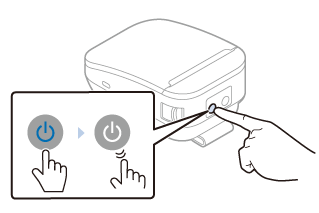
Turning the Power Off

Press the power button for about two seconds and release it when the power LED goes off or starts flashing.

  • Back
  • Top
  • Next

©Seiko Epson Corporation 2022 (M00148800 EN)

Language selection

  • English
  • Français
  • Deutsch
  • Nederlands
  • Italiano
  • Español
  • Português
  • Türkçe
  • Ελληνικά
  • Slovenščina
  • Hrvatski
  • Македонски
  • Srpski
  • Dansk
  • Suomi
  • Norsk
  • Svenska
  • Polski
  • Česky
  • Magyar
  • Slovenčina
  • Română
  • Български
  • Latviešu
  • Lietuvių
  • Eesti
  • Русский
  • Українська
  • Қазақ
  • العربية
  • 简体中文
  • 日本語