
Before Using the Printer
Part Names
Basic Operations
Setup
Cleaning
Troubleshooting
Product Specifications
Appendix
Top > Basic Operations > Anti-Curl Function
Anti-Curl Function
The printer is equipped with the anti-curl function. The function reduces the curl of the roll paper after printing.
Disabling the anti-curl function speeds up printing.
 Note:
Note:When the remaining amount of roll paper is low and is about to reach the core, the anti-curl function declines.
How to Disable the Anti-Curl Function
-
Open the roll paper cover.
-
Remove the roll paper in use, if any.
-
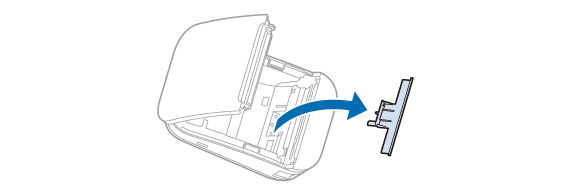
Remove the part for the anti-curl function as shown below.
-
Install the roll paper and close the roll paper cover.
 How to Open the Roll Paper Cover
 Note:
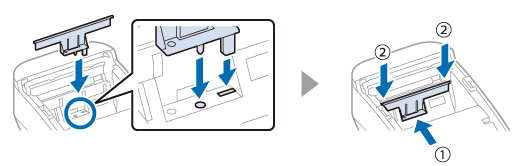
Note:To activate the anti-curl function, install the part for the anti-curl function again.
Before Using the Printer
Part Names
Basic Operations
Setup
Cleaning
Troubleshooting
Product Specifications
Appendix
Top > Basic Operations > Anti-Curl Function
Anti-Curl Function
The printer is equipped with the anti-curl function. The function reduces the curl of the roll paper after printing.
Disabling the anti-curl function speeds up printing.
Note:When the remaining amount of roll paper is low and is about to reach the core, the anti-curl function declines.
How to Disable the Anti-Curl Function
-
Open the roll paper cover.
-
Remove the roll paper in use, if any.
-
Remove the part for the anti-curl function as shown below.
-
Install the roll paper and close the roll paper cover.
How to Open the Roll Paper Cover
Note:To activate the anti-curl function, install the part for the anti-curl function again.