Epson
LW-C610/LW-C610PX User's Guide

Epson

LW-C610/LW-C610PX User's Guide

Introduction to Your LABELWORKS Printer

Notations Used in the DocumentationAbout Your Printer Model NumberProduct Box ContentsLabel Printer Parts

Setting Up the Printer

Preparing the power supplyInserting Tape CartridgesRemoving Tape CartridgesTurning the Printer On and Off

Using the Label Printer With Your Mobile Device

Installing Epson App for Creating LabelsConnecting the Printer to Your Mobile DeviceTurning Off Bluetooth® on the Printer

Using the Printer With Your Windows® Computer

Downloading Printer Driver and Epson Software for Windows ComputerInstalling Label Editor and Connecting the Printer to Your Windows ComputerTurning Off Bluetooth® on the Printer

Applying Your Labels

Applying Your Labels

Cleaning the Printer

Cleaning the Outside of the PrinterCleaning the Print Head

Solving Problems

Meanings of lampResetting the PrinterSolutions When the Printer Does Not Turn OnSolutions to Problems Pairing with BluetoothSolutions When the Printer Does Not PrintSolutions When Print Quality Is PoorSolutions to Tape Cutting ProblemsSolutions to Problems Attaching LabelsWhere to Get Help

Technical Specifications

PrinterBluetooth® Communication

Notices

TrademarksCopyright Notice

Top > Introduction to Your LABELWORKS Printer > About Your Printer Model Number

About Your Printer Model Number

The model number of the printer differs depending on the country or region where you purchased it. The model number can be found on the printer itself.
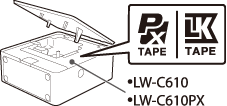
Tape cartridges that can be used are different for each printer model. Use compatible label tapes that have the same logo as the one shown on the printer.

Supported tape cartridge
For more information, visit the website below.

Use only tape cartridges with the mark .

https://www.epson.com/

Use only tape cartridges with the mark .

https://labelworks.epson.com

Introduction to Your LABELWORKS Printer

Notations Used in the DocumentationAbout Your Printer Model NumberProduct Box ContentsLabel Printer Parts

Setting Up the Printer

Preparing the power supplyInserting Tape CartridgesRemoving Tape CartridgesTurning the Printer On and Off

Using the Label Printer With Your Mobile Device

Installing Epson App for Creating LabelsConnecting the Printer to Your Mobile DeviceTurning Off Bluetooth® on the Printer

Using the Printer With Your Windows® Computer

Downloading Printer Driver and Epson Software for Windows ComputerInstalling Label Editor and Connecting the Printer to Your Windows ComputerTurning Off Bluetooth® on the Printer

Applying Your Labels

Applying Your Labels

Cleaning the Printer

Cleaning the Outside of the PrinterCleaning the Print Head

Solving Problems

Meanings of lampResetting the PrinterSolutions When the Printer Does Not Turn OnSolutions to Problems Pairing with BluetoothSolutions When the Printer Does Not PrintSolutions When Print Quality Is PoorSolutions to Tape Cutting ProblemsSolutions to Problems Attaching LabelsWhere to Get Help

Technical Specifications

PrinterBluetooth® Communication

Notices

TrademarksCopyright Notice

Top > Introduction to Your LABELWORKS Printer > About Your Printer Model Number

About Your Printer Model Number

The model number of the printer differs depending on the country or region where you purchased it. The model number can be found on the printer itself.

Tape cartridges that can be used are different for each printer model. Use compatible label tapes that have the same logo as the one shown on the printer.

Supported tape cartridge
For more information, visit the website below.

Use only tape cartridges with the mark .

https://www.epson.com/

Use only tape cartridges with the mark .

https://labelworks.epson.com

©Seiko Epson Corporation 2022–2025 (M00148101 EN)