زبانه Enhancements
شما میتوانید تنظیمات بهبود که حین اسکن کردن به طور خودکار به تصویر اسکن شده اعمال میشوند را تغییر دهید.
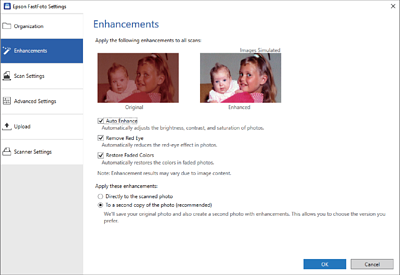
نکته:
بسته به محتوای تصویری عکسها، ممکن است نتایج بهبود متفاوت باشند.
- Auto Enhance
-
Automatically adjusts the brightness, contrast, and saturation of photos.
- Remove Red Eye
-
Automatically reduces the red-eye effect in photos.
- Restore Faded Colors
-
Automatically restores the colors in faded photos.
- Apply these enhancements
-
-
Directly to the scanned photo: تنها تصویر اسکن شده بهبود یافته در پوشه شما ذخیره میشود و تصویر اسکن شده ذخیره نمیشود.
-
To a second copy of the photo (recommended): دو تصویر برای هر عکس ذخیره میکند. یکی تصویر اسکن شده اصلی است و دیگری تصویر بهبود یافته است.
-