Top > Part Names > Part Names
Part Names
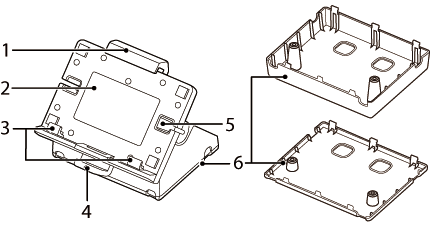
|
1 |
Slider |
Slide this to secure the tablet. |
|
2 | Holder |
Tablet mounting surface. |
|
3 |
Bottom arms |
Adjust according to the tablet size. |
|
4 |
Front lever |
Operate when rotating the holder. |
|
5 |
Cable hole |
Hole for routing the charging cable for the tablet. |
|
6 |
Bottom cover |
There are two sizes, A and B, available to suit various tablet sizes. |
|
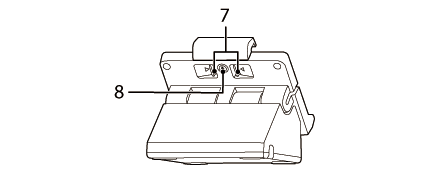
7 |
Back lever |
Operate when attaching/detaching the tablet. |
|
8 |
Lock |
When locked, the back lever is locked in place. |
Connector
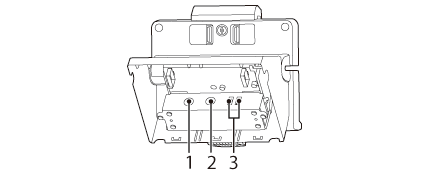
|
1 |
Power input connector |
Connects the DC cable of the AC adapter. |
|
2 |
Power output connector |
Connects the power connection cable. |
|
3 |
USB connector |
Connects the USB cable from the device. The power supply capacity is a total of 2.6 A, and 2.1A individually.
 CAUTION: CAUTION:It may be hard to disconnect some types of USB cable. Do not forcibly pull the cable, or the USB connector and USB cable may be damaged. Contact your dealer if you encounter the trouble. |
Top > Part Names > Part Names
Part Names
|
1 |
Slider |
Slide this to secure the tablet. |
|
2 | Holder |
Tablet mounting surface. |
|
3 |
Bottom arms |
Adjust according to the tablet size. |
|
4 |
Front lever |
Operate when rotating the holder. |
|
5 |
Cable hole |
Hole for routing the charging cable for the tablet. |
|
6 |
Bottom cover |
There are two sizes, A and B, available to suit various tablet sizes. |
|
7 |
Back lever |
Operate when attaching/detaching the tablet. |
|
8 |
Lock |
When locked, the back lever is locked in place. |
Connector
|
1 |
Power input connector |
Connects the DC cable of the AC adapter. |
|
2 |
Power output connector |
Connects the power connection cable. |
|
3 |
USB connector |
Connects the USB cable from the device. The power supply capacity is a total of 2.6 A, and 2.1A individually.
CAUTION:It may be hard to disconnect some types of USB cable. Do not forcibly pull the cable, or the USB connector and USB cable may be damaged. Contact your dealer if you encounter the trouble. |