Top > Setup > Connecting the Power Supply
Connecting the Power Supply
Follow the steps below to connect the power supply.
 CAUTION:
Do not use an AC adapter other than the PS-180.
-
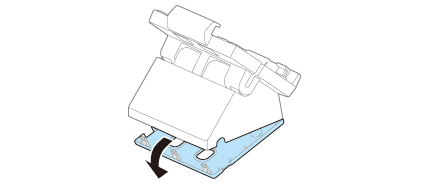
Remove the bottom cover.
-
Connect the DC cable of the AC adapter to the power input connector.
-
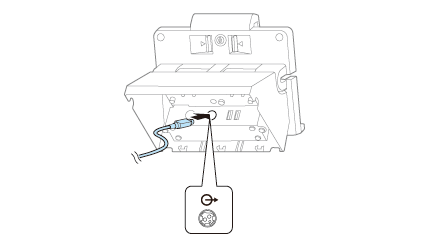
Connect the power connection cable to the power output connector.
-
Connect the other end of the power connection cable to the printer's power supply connector.

Top > Setup > Connecting the Power Supply
Connecting the Power Supply
Follow the steps below to connect the power supply.
CAUTION:Do not use an AC adapter other than the PS-180.
-
Remove the bottom cover.
-
Connect the DC cable of the AC adapter to the power input connector.
-
Connect the power connection cable to the power output connector.
-
Connect the other end of the power connection cable to the printer's power supply connector.