Language
Epson

OT-ST30

User's Manual

Epson

OT-ST30

User's Manual

Before Using the Printer

Important Safety InformationDownloading ManualsChecking Items Included with the Product

Part Names

Part Names

Setup

Installing the StandConnecting the Power SupplyConnecting the Charging Cable for the TabletAttaching the Plate Lock on the TabletAttaching the Tablet

Basic Operations

Rotating the HolderRemoving the TabletCleaning the Product

Appendix

SpecificationsRestriction of UseCAUTIONSTrademarks

Top > Basic Operations > Removing the Tablet

Removing the Tablet

Follow the steps below to remove the tablet from the holder.

  1. Detach the cables connected to the tablet.

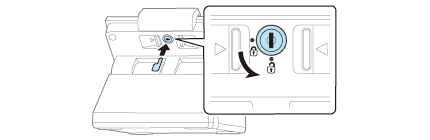
  2. Unlock.

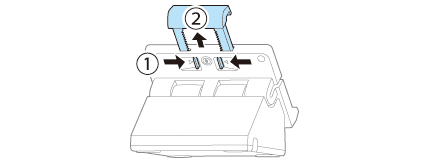
  3. Pinch the back lever and pull up the slider.

  4. Remove the tablet.

  • Back
  • Top
  • Next

Before Using the Printer

Important Safety InformationDownloading ManualsChecking Items Included with the Product

Part Names

Part Names

Setup

Installing the StandConnecting the Power SupplyConnecting the Charging Cable for the TabletAttaching the Plate Lock on the TabletAttaching the Tablet

Basic Operations

Rotating the HolderRemoving the TabletCleaning the Product

Appendix

SpecificationsRestriction of UseCAUTIONSTrademarks

Top > Basic Operations > Removing the Tablet

Removing the Tablet

Follow the steps below to remove the tablet from the holder.

  1. Detach the cables connected to the tablet.

  2. Unlock.

  3. Pinch the back lever and pull up the slider.

  4. Remove the tablet.

  • Back
  • Top
  • Next

©Seiko Epson Corporation 2015-2016 (M00102501 EN)

Language selection

  • English
  • Français
  • Deutsch
  • Nederlands
  • Italiano
  • Español
  • Português
  • Türkçe
  • Ελληνικά
  • Slovenščina
  • Hrvatski
  • Dansk
  • Suomi
  • Norsk
  • Svenska
  • Polski
  • Česky
  • Magyar
  • Slovenčina
  • Română
  • Български
  • Latviešu
  • Lietuvių
  • Eesti
  • Русский
  • Українська
  • Қазақ
  • العربية
  • 简体中文
  • 繁體中文(香港)