Language
Epson

TM-m30II-SL

User's Manual

Epson

TM-m30II-SL

User's Manual

Troubleshoot
Troubleshooting

Before Using the Printer

Important Safety InformationProduct Information PageChecking Items Included with the Printer

Part Names

FrontBottomConnectors

Setup of the Tablet

Tablets that Can be Mounted to the PrinterFront tabletRear displayPreparation for SetupMounting the Front TabletConnecting Peripheral DevicesConnecting the AC CableAttaching the Lock Lever CoverReplacing the Tablet Table

Setup of the Printer

Placing the PrinterChanging the Paper WidthConnecting Peripheral DevicesUsing the Power Switch CoverConnecting Smart Devices

Basic Operations

Turning the Power On/OffInstalling or Replacing the Roll PaperHow to Hold the PrinterTransporting the Printer

Cleaning

Cleaning the Printer CaseCleaning the Thermal Head and the Platen Roller

Troubleshooting

Meanings of LED IndicationsPrintout is FaintCannot PrintWhen the Roll Paper JamsWhen Sending for Repair

Using the Optional Products

OT-DM30SL (Customer Display)OT-WH30SL (Wall Hanging Bracket Set)

Appendix

SpecificationsOptional KitsRestriction of UseCAUTIONSTrademarks

Top > Part Names > Bottom

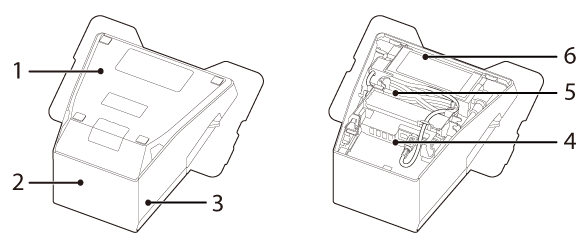
Bottom

1

Bottom cover

Remove this cover when connecting interface cables to the connectors inside the printer.

2

Rear cover

Remove this cover when connecting interface cables to the connectors inside the printer.

3

Side cover

Remove this cover when connecting interface cables to the connectors inside the printer.

4

Connectors

For connecting various devices to the printer.

5

DC cable

The AC adapter supplies power to the printer through this cable.

6

AC adapter

Supplies power to the printer.

Be sure to use the specified AC adapter (PS-180 (Model: M159E). Connection to an improper power source may cause fire.

  • Back
  • Top
  • Next
Troubleshoot
Troubleshooting

Before Using the Printer

Important Safety InformationProduct Information PageChecking Items Included with the Printer

Part Names

FrontBottomConnectors

Setup of the Tablet

Tablets that Can be Mounted to the PrinterFront tabletRear displayPreparation for SetupMounting the Front TabletConnecting Peripheral DevicesConnecting the AC CableAttaching the Lock Lever CoverReplacing the Tablet Table

Setup of the Printer

Placing the PrinterChanging the Paper WidthConnecting Peripheral DevicesUsing the Power Switch CoverConnecting Smart Devices

Basic Operations

Turning the Power On/OffInstalling or Replacing the Roll PaperHow to Hold the PrinterTransporting the Printer

Cleaning

Cleaning the Printer CaseCleaning the Thermal Head and the Platen Roller

Troubleshooting

Meanings of LED IndicationsPrintout is FaintCannot PrintWhen the Roll Paper JamsWhen Sending for Repair

Using the Optional Products

OT-DM30SL (Customer Display)OT-WH30SL (Wall Hanging Bracket Set)

Appendix

SpecificationsOptional KitsRestriction of UseCAUTIONSTrademarks

Top > Part Names > Bottom

Bottom

1

Bottom cover

Remove this cover when connecting interface cables to the connectors inside the printer.

2

Rear cover

Remove this cover when connecting interface cables to the connectors inside the printer.

3

Side cover

Remove this cover when connecting interface cables to the connectors inside the printer.

4

Connectors

For connecting various devices to the printer.

5

DC cable

The AC adapter supplies power to the printer through this cable.

6

AC adapter

Supplies power to the printer.

Be sure to use the specified AC adapter (PS-180 (Model: M159E). Connection to an improper power source may cause fire.

  • Back
  • Top
  • Next

©Seiko Epson Corporation 2021 (M00135700  EN)

Language selection

  • English
  • Français
  • Deutsch
  • Nederlands
  • Italiano
  • Español
  • Português
  • Türkçe
  • Ελληνικά
  • Slovenščina
  • Hrvatski
  • Македонски
  • Srpski
  • Dansk
  • Suomi
  • Norsk
  • Svenska
  • Polski
  • Česky
  • Magyar
  • Slovenčina
  • Română
  • Български
  • Latviešu
  • Lietuvių
  • Eesti
  • العربية
  • Bahasa Indonesia
  • ภาษาไทย
  • 日本語