Introduction to Your LABELWORKS Printer
Setting Up the Printer
Using the Label Printer With Your Mobile Device
Installing Epson App for Creating LabelsConnecting the Printer to Your Mobile DeviceTurning Off Bluetooth® on the Printer
Using the Printer With Your Computer
Downloading Printer Driver and Epson SoftwareInstalling Label Editor and Connecting the Printer to Your ComputerTurning Off Bluetooth® on the Printer
Applying Your Labels
Cleaning the Printer
Solving Problems
Product Error MessagesResetting the PrinterSolutions When the Printer Does Not Turn OnSolutions to Problems Pairing with Bluetooth®Solutions When the Printer Does Not PrintSolutions to Computer Printing ProblemsSolutions When Print Quality Is PoorSolutions to Tape Cutting ProblemsSolutions to Problems Attaching LabelsWhere to Get Help
Technical Specifications
Notices
Top > Setting Up the Printer > Turning the Printer On and Off
Turning the Printer On and Off
Make sure the batteries are installed.
Related tasks

Related references
 button to turn on the printer. The
  Bluetooth lamp turns on and Bluetooth is enabled.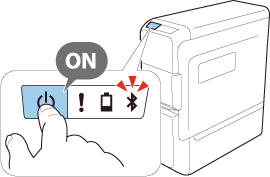
 Note
NoteIntroduction to Your LABELWORKS Printer
Setting Up the Printer
Using the Label Printer With Your Mobile Device
Installing Epson App for Creating LabelsConnecting the Printer to Your Mobile DeviceTurning Off Bluetooth® on the Printer
Using the Printer With Your Computer
Downloading Printer Driver and Epson SoftwareInstalling Label Editor and Connecting the Printer to Your ComputerTurning Off Bluetooth® on the Printer
Applying Your Labels
Cleaning the Printer
Solving Problems
Product Error MessagesResetting the PrinterSolutions When the Printer Does Not Turn OnSolutions to Problems Pairing with Bluetooth®Solutions When the Printer Does Not PrintSolutions to Computer Printing ProblemsSolutions When Print Quality Is PoorSolutions to Tape Cutting ProblemsSolutions to Problems Attaching LabelsWhere to Get Help
Technical Specifications
Notices
Top > Setting Up the Printer > Turning the Printer On and Off
Turning the Printer On and Off
Make sure the batteries are installed.
Related tasks
Related references