-
-
-
-
-
-
Network Service and Software Information
-
Application for Scanning Documents and Images (Epson Scan 2)
-
Application for Configuring Scanning Operations from the Control Panel (Epson Event Manager)
-
Application for Quick and Fun Printing from a Computer (Epson Photo+)
-
Application for Easily Operating the Printer from a Smart device (Epson Smart Panel)
-
Application for Updating Software and Firmware (EPSON Software Updater)
-
-
-
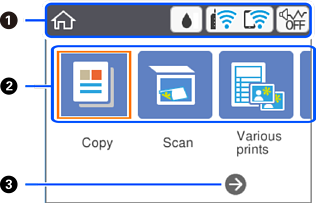
Guide to the Home Screen
|
|
Indicates items that have been setup for the printer as icons. Select the icon by pressing the |
|
|
|
Displays each menu. |
|
|
Copy |
Allows you to copy a document. |
|
|
Scan |
Allows you to scan a document or a photo. |
|
|
Various prints |
Offers various printing features such as copying in various layouts and printing ruled paper or calendars. |
|
|
Settings |
Allows you to make settings related to maintenance, printer setup, and network settings. |
|
|
Maintenance |
Displays the menus recommended to improve the quality of your printouts such as unclogging nozzles by printing a nozzle check pattern and performing head cleaning, and improving blurring or banding in your printouts by aligning the print head. |
|
|
Smartphone connect |
Allows you to connect the printer directly to your smart device without a wireless router. |
|
|
|
You can scroll right by pressing the |
|


 buttons, and then press the
