-
-
-
-
-
-
Network Service and Software Information
-
Application for Scanning Documents and Images (Epson Scan 2)
-
Application for Configuring Scanning Operations from the Control Panel (Epson Event Manager)
-
Application for Quick and Fun Printing from a Computer (Epson Photo+)
-
Application for Easily Operating the Printer from a Smart device (Epson Smart Panel)
-
Application for Updating Software and Firmware (EPSON Software Updater)
-
-
-
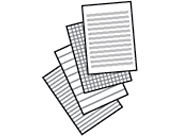
Printing Lined Paper
You can print some types of lined paper, graph paper, or music paper and create your own, original notebook or loose-leaf.
-
Load paper in the printer.
-
Select Various prints on the control panel.
To select an item, use the


 buttons, and then press the
OK button.
buttons, and then press the
OK button.
-
Select Ruled Paper.
-
Select the type of ruled line.
-
Make the paper settings.
-
Press the
button.
-
Enter the number of copies, and then press the
 button.
