-
-
-
-
-
-
Network Service and Software Information
-
Application for Scanning Documents and Images (Epson Scan 2)
-
Application for Configuring Scanning Operations from the Control Panel (Epson Event Manager)
-
Application for Quick and Fun Printing from a Computer (Epson Photo+)
-
Application for Easily Operating the Printer from a Smart device (Epson Smart Panel)
-
Application for Updating Software and Firmware (EPSON Software Updater)
-
-
-
Folding Envelopes
After printing a diagram of an envelope, print an instruction sheet that shows you how to fold the envelope, and then lay the instruction sheet on top of the diagram and fold them together.
-
Select Origami Envelope Instruction from the Origami menu.
-
Select the envelope size that you selected to print the envelope diagram.
-
Load A4 plain paper in the printer, and then press the OK button.
-
Enter the number of copies, and then press the
 button.
The following instruction sheet is printed.
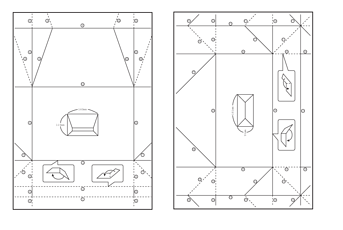
-
Lay the instruction sheet on top of the envelope diagram, and then fold them together following the instructions on the instruction sheet.
-
When finished, unfold them and remove the instruction sheet, and then fold only the envelope diagram again along its creases.
