Before Using the Product
Part Names
Setup
Basic Operations
Installing the Product in Various Ways
Cleaning
Troubleshooting
Appendix
Top > Part Names > Part Names
Part Names
|
Part name
|
Description
|
|
|
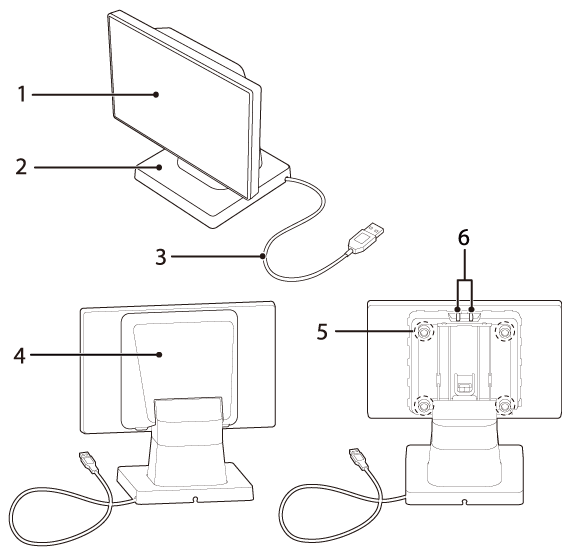
1 |
Display |
A LCD screen. The display can be tilted forward or back, and to the left or right. |
|
2 |
Stand |
Supports the display unit. |
|
3 |
USB cable |
Use to connect to the printer or a computer. |
|
4 |
Rear cover |
Remove this cover when operating the brightness up/down buttons or when changing the display orientation from landscape to portrait. |
|
5 |
Screws (4 pieces) |
Remove the screws when changing the display orientation from landscape to portrait, or when connecting the display to a VESA mount. The screws can be turned by hand. |
|
6 |
Brightness up/down buttons |
Allows you to adjust the brightness of the display. |
Before Using the Product
Part Names
Setup
Basic Operations
Installing the Product in Various Ways
Cleaning
Troubleshooting
Appendix
Top > Part Names > Part Names
Part Names
|
Part name
|
Description
|
|
|
1 |
Display |
A LCD screen. The display can be tilted forward or back, and to the left or right. |
|
2 |
Stand |
Supports the display unit. |
|
3 |
USB cable |
Use to connect to the printer or a computer. |
|
4 |
Rear cover |
Remove this cover when operating the brightness up/down buttons or when changing the display orientation from landscape to portrait. |
|
5 |
Screws (4 pieces) |
Remove the screws when changing the display orientation from landscape to portrait, or when connecting the display to a VESA mount. The screws can be turned by hand. |
|
6 |
Brightness up/down buttons |
Allows you to adjust the brightness of the display. |