Before Using the Product
Part Names
Setup
Basic Operations
Installing the Product in Various Ways
Cleaning
Troubleshooting
Appendix
Top > Basic Operations > Adjusting the Display Brightness
Adjusting the Display Brightness
The brightness of the display can be adjusted by pressing the brightness up/down buttons.
 Note:
Note:It is set to the brightest setting by default.
-
Turn on the display by connecting it to the printer or a computer.
-
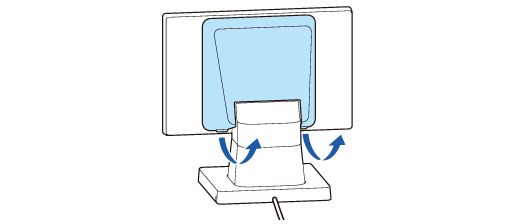
Remove the rear cover.
-
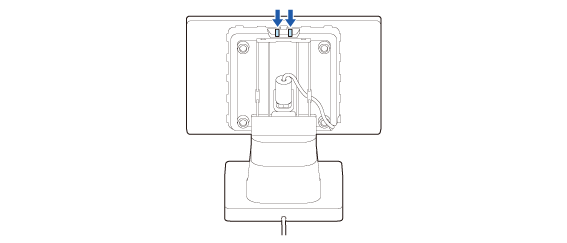
Press the brightness up/down buttons to adjust the brightness. There are four brightness levels.
-
Attach the rear cover.
Before Using the Product
Part Names
Setup
Basic Operations
Installing the Product in Various Ways
Cleaning
Troubleshooting
Appendix
Top > Basic Operations > Adjusting the Display Brightness
Adjusting the Display Brightness
The brightness of the display can be adjusted by pressing the brightness up/down buttons.
Note:It is set to the brightest setting by default.
-
Turn on the display by connecting it to the printer or a computer.
-
Remove the rear cover.
-
Press the brightness up/down buttons to adjust the brightness. There are four brightness levels.
-
Attach the rear cover.