Language
Epson

TM-m30III-H

User's Manual

Epson

TM-m30III-H

User's Manual

Troubleshoot
Troubleshooting

Before Using the Printer

Important Safety InformationManuals for This ProductProduct Information PageChecking Items Included with the Printer

Part Names

BodyPanel LEDConnectors

Setup

Checking/Changing the Installation DirectionChanging the Paper WidthConnecting CablesRouting Cables in Various DirectionsConnecting Smart Devices

Basic Operations

Turning the Power On/OffRemoving the Printer CoversAttaching the Printer CoversInstalling or Replacing the Roll Paper

Cleaning

Cleaning the Printer CaseCleaning the Thermal Head and the Platen Roller

Troubleshooting

About the QR Code Label on the PrinterMeanings of LED IndicationsPrintout is FaintCannot PrintWhen the Roll Paper Jams

Product Specifications

SpecificationsChecking the Product Name and Model NumberList of Installed Interfaces by Model

Appendix

Restriction of UseCAUTIONSTrademarks

Top > Before Using the Printer > Checking Items Included with the Printer

Checking Items Included with the Printer

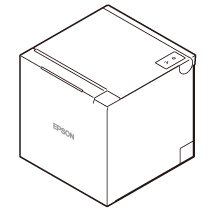
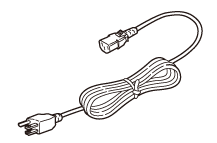
The following items are included with the printer. If any item is damaged or missing, contact qualified service personnel. Other items may be included depending on the printer model.

  • Printer

  • 58-mm width roll paper guides

  • Manuals

  • Roll paper for operation check

  • AC adapter

  • AC cable

  • Back
  • Top
  • Next
Troubleshoot
Troubleshooting

Before Using the Printer

Important Safety InformationManuals for This ProductProduct Information PageChecking Items Included with the Printer

Part Names

BodyPanel LEDConnectors

Setup

Checking/Changing the Installation DirectionChanging the Paper WidthConnecting CablesRouting Cables in Various DirectionsConnecting Smart Devices

Basic Operations

Turning the Power On/OffRemoving the Printer CoversAttaching the Printer CoversInstalling or Replacing the Roll Paper

Cleaning

Cleaning the Printer CaseCleaning the Thermal Head and the Platen Roller

Troubleshooting

About the QR Code Label on the PrinterMeanings of LED IndicationsPrintout is FaintCannot PrintWhen the Roll Paper Jams

Product Specifications

SpecificationsChecking the Product Name and Model NumberList of Installed Interfaces by Model

Appendix

Restriction of UseCAUTIONSTrademarks

Top > Before Using the Printer > Checking Items Included with the Printer

Checking Items Included with the Printer

The following items are included with the printer. If any item is damaged or missing, contact qualified service personnel. Other items may be included depending on the printer model.

  • Printer

  • 58-mm width roll paper guides

  • Manuals

  • Roll paper for operation check

  • AC adapter

  • AC cable

  • Back
  • Top
  • Next

©Seiko Epson Corporation 2022 (M00146701 EN)

Language selection

  • English
  • Français
  • Deutsch
  • Nederlands
  • Italiano
  • Español
  • Português
  • Türkçe
  • Ελληνικά
  • Slovenščina
  • Hrvatski
  • Македонски
  • Srpski
  • Dansk
  • Suomi
  • Norsk
  • Svenska
  • Polski
  • Česky
  • Magyar
  • Slovenčina
  • Română
  • Български
  • Latviešu
  • Lietuvių
  • Eesti
  • Русский
  • Українська
  • Қазақ
  • العربية
  • 日本語