
Before Using the Scanner
Important Safety InformationManuals for This ProductProduct Information PageChecking Items Included with the Scanner
Part Names
Setup
Removing the Packing MaterialsConnecting the Scanner to a Host ComputerConnecting the AC AdapterConnecting the Wireless LAN UnitAttaching the Connector CoverInstalling the Franking CartridgeExtending the Guides
Basic Operations
Turning the Power On/OffOpening the CoversInstalling and Replacing the Franking CartridgeProcessing Documents
Cleaning
Troubleshooting
About the QR Code Label on the ScannerThe Product Does Not Turn OnMeanings of LED IndicationsPaper JamsDocuments are not Fed Properly
Product Specifications
SpecificationsNameplate Location
Appendix
Top > Product Specifications > Nameplate Location
Nameplate Location
The nameplate is affixed to the bottom of the scanner.
It shows the product name, model number, and serial number.
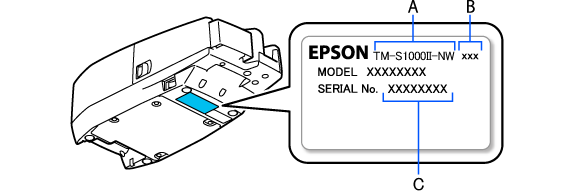
A: Product name
B: Model number
C: Serial number
Before Using the Scanner
Important Safety InformationManuals for This ProductProduct Information PageChecking Items Included with the Scanner
Part Names
Setup
Removing the Packing MaterialsConnecting the Scanner to a Host ComputerConnecting the AC AdapterConnecting the Wireless LAN UnitAttaching the Connector CoverInstalling the Franking CartridgeExtending the Guides
Basic Operations
Turning the Power On/OffOpening the CoversInstalling and Replacing the Franking CartridgeProcessing Documents
Cleaning
Troubleshooting
About the QR Code Label on the ScannerThe Product Does Not Turn OnMeanings of LED IndicationsPaper JamsDocuments are not Fed Properly
Product Specifications
SpecificationsNameplate Location
Appendix
Top > Product Specifications > Nameplate Location
Nameplate Location
The nameplate is affixed to the bottom of the scanner.
It shows the product name, model number, and serial number.
A: Product name
B: Model number
C: Serial number