Scan Settings Tab
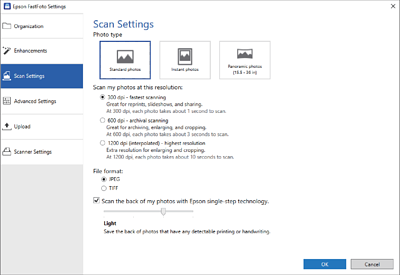
- Photo type
-
Selects a photo type you want to scan. Applies special settings for instant and panoramic photos when scanning.
- Scan my photos at this resolution
-
Selects a resolution to scan your photos. Increasing the resolution increases the scanning time and file size.
- File format
-
Selects a file format to save the scanned image.
When you select JPEG and set the resolution to 1200 dpi or 600 dpi, the scanned image is saved at 100% JPEG quality (compression).
If you select 300 dpi, the JPEG quality (compression) is set to 84% automatically to reduce the file size when saving the scanned image.
- Scan the back of my photos with Epson single-step technology
-
When scanning photos, you can also scan the back of the photos.
If text on the back of the photos is detected, the back sides of the photos are scanned. If the back sides are blank, the back sides of the photos are not scanned.