Enhancements Tab
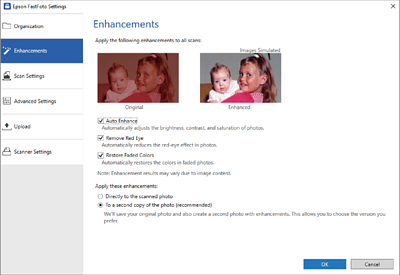
You can change the enhancement settings which are automatically applied to the scanned image when scanning.
Note:
Enhancement results may vary depending on the image contents of the photos.
- Auto Enhance
-
Automatically adjusts the brightness, contrast, and saturation of photos.
- Remove Red Eye
-
Automatically reduces the red-eye effect in photos.
- Restore Faded Colors
-
Automatically restores the colors in faded photos.
- Apply these enhancements
-
-
Directly to the scanned photo: Only the enhanced scanned image is saved in your folder, and the original scanned image is not saved.
-
To a second copy of the photo (recommended): Saves two images for each photo. One is the original scanned image, and another is the enhanced image.
-