About Epson FastFoto
How to Scan Photos
Step 1: Organizing Photos
Step 2: Placing Photos into the Scanner
Step 3: Scanning and Saving Photos
Sharing Photos
Uploading Photos
Editing Photos
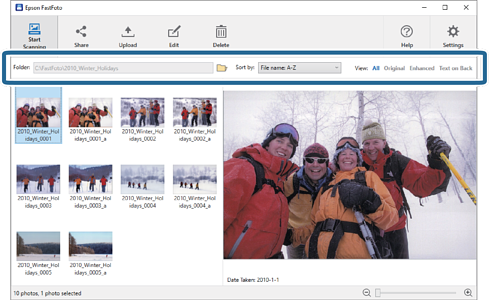
Changing the Displayed Folder and Thumbnail View
Epson FastFoto Settings
Organization Tab
Enhancements Tab
Scan Settings Tab
Advanced Settings Tab
Upload Tab
Scanner Settings Tab
Tips for Using Epson FastFoto
Scanning Instant Photos
Scanning Panoramic Photos
Scanning Back Side Notes on Photos
Enabling or Disabling Glass Surface Dirt Alert
Changing the Application to Scan from the Scan Button
Troubleshooting
Straight Lines Appear
The Image Quality Is Poor
Pressing the Scanner Button Does Not Start Epson FastFoto
Cannot Share or Upload the Photos to a Web Service
Appendix
Internet Connection
The current folder is displayed. You can change the folder by clicking the icon.
You can change how thumbnails are viewed or sorted.
You can filter the thumbnails.
 icon.
icon.