
Before Using the Printer
Part Names
Setup
Basic Operations
Cleaning
Troubleshooting
Appendix
Top > Appendix > Specifications
Specifications
Roll paper
|
Width |
80 mm (3.15“) |
79.5 mm ± 0.5 mm (3.13" ± 0.02") |
|
58 mm (2.28“) |
57.5 mm ± 0.5 mm (2.26" ± 0.02") |
|
|
40 mm (1.57“) |
39.5 mm ± 0.5 mm (1.55" ± 0.02") |
|
|
Diameter |
Up to 102 mm (4.02“) |
|
Interface
The on-board interface can be checked from the displayed LED lights.
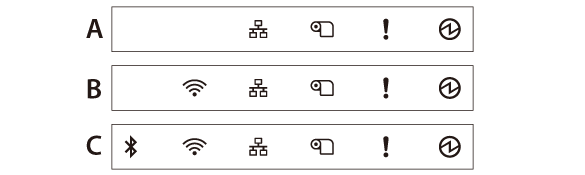
|
Serial |
Ethernet |
USB Type-B |
USB Type-A |
USB Type-A (Device Charging) |
Bluetooth |
Drawer kick |
|
|
A |
✔ |
✔ |
✔ |
- |
- |
- |
✔ |
|
B |
- |
✔ |
✔ |
✔ |
✔ |
- |
✔ |
|
C |
- |
✔ |
✔ |
✔ |
✔ |
✔ |
✔ |
|
Serial |
RS-232C 9pin |
|
Ethernet |
10BASE-T/100BASE-TX |
|
USB Type-A |
USB 2.0 Full speed |
|
USB Type-B |
USB 2.0 Full speed |
|
USB Type-A (Device Charging) |
USB 2.0 compliant |
|
Bluetooth |
Bluetooth 3.0 (EDR is supported) |
|
Drawer kick |
X1 |
|
Wi-Fi |
Connect the optional wireless LAN unit to the USB Type-A connector. For information about the wireless LAN unit, see the Technical Reference Guide or the manual of the wireless LAN unit. |
Power supply
PS-190 (Model: M368A)
Be sure to use the specified AC adapter. Using another AC adapter may result in causing fire or shock.
AC power consumption (100 to 230 V/50 to 60Hz)
|
Operating |
Approx. 31.3 W |
|
Standby |
Approx. 1.6 W |
This is the average power under our operation conditions. It varies depending on the conditions of use and the model.
Temperature
|
Operating |
Thermal paper |
5 to 45˚C (41 to 113˚F), no condensation |
|
Liner-free label paper |
Guaranteed environmental range of paper |
|
|
Storage |
–10 to 50˚C (14 to 122˚F), except for roll paper |
|
Humidity
|
Operating |
Thermal paper |
10 to 90% RH, no condensation |
|
Liner-free label paper |
Guaranteed environmental range of paper |
|
|
Storage |
10 to 90% RH, except for paper |
|
Altitude
3,000 m or less
Before Using the Printer
Part Names
Setup
Basic Operations
Cleaning
Troubleshooting
Appendix
Top > Appendix > Specifications
Specifications
Roll paper
|
Width |
80 mm (3.15“) |
79.5 mm ± 0.5 mm (3.13" ± 0.02") |
|
58 mm (2.28“) |
57.5 mm ± 0.5 mm (2.26" ± 0.02") |
|
|
40 mm (1.57“) |
39.5 mm ± 0.5 mm (1.55" ± 0.02") |
|
|
Diameter |
Up to 102 mm (4.02“) |
|
Interface
The on-board interface can be checked from the displayed LED lights.
|
Serial |
Ethernet |
USB Type-B |
USB Type-A |
USB Type-A (Device Charging) |
Bluetooth |
Drawer kick |
|
|
A |
✔ |
✔ |
✔ |
- |
- |
- |
✔ |
|
B |
- |
✔ |
✔ |
✔ |
✔ |
- |
✔ |
|
C |
- |
✔ |
✔ |
✔ |
✔ |
✔ |
✔ |
|
Serial |
RS-232C 9pin |
|
Ethernet |
10BASE-T/100BASE-TX |
|
USB Type-A |
USB 2.0 Full speed |
|
USB Type-B |
USB 2.0 Full speed |
|
USB Type-A (Device Charging) |
USB 2.0 compliant |
|
Bluetooth |
Bluetooth 3.0 (EDR is supported) |
|
Drawer kick |
X1 |
|
Wi-Fi |
Connect the optional wireless LAN unit to the USB Type-A connector. For information about the wireless LAN unit, see the Technical Reference Guide or the manual of the wireless LAN unit. |
Power supply
PS-190 (Model: M368A)
Be sure to use the specified AC adapter. Using another AC adapter may result in causing fire or shock.
AC power consumption (100 to 230 V/50 to 60Hz)
|
Operating |
Approx. 31.3 W |
|
Standby |
Approx. 1.6 W |
This is the average power under our operation conditions. It varies depending on the conditions of use and the model.
Temperature
|
Operating |
Thermal paper |
5 to 45˚C (41 to 113˚F), no condensation |
|
Liner-free label paper |
Guaranteed environmental range of paper |
|
|
Storage |
–10 to 50˚C (14 to 122˚F), except for roll paper |
|
Humidity
|
Operating |
Thermal paper |
10 to 90% RH, no condensation |
|
Liner-free label paper |
Guaranteed environmental range of paper |
|
|
Storage |
10 to 90% RH, except for paper |
|
Altitude
3,000 m or less