
Introduction to Your LABELWORKS Printer
Setting Up the Printer
Using the Label Printer With Your Mobile Device via Bluetooth®
Using with a Windows® Computer via Bluetooth®
Using with a Windows® Computer via USB
Using with a Mac Computer
Applying Your Labels
Cleaning the Printer
Solving Problems
Appendix
Notices
Top > Introduction to Your LABELWORKS Printer > About Your Printer Model Number
About Your Printer Model Number
The model number of the printer differs depending on the country or region where you purchased it. The model number can be found on the printer itself.
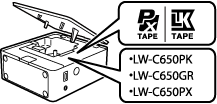
Tape cartridges that can be used are different for each printer model. Use compatible label tapes that have the same logo as the one shown on the printer.
|
Printer model number
|
Supported tape cartridge
|
For more information, visit the website below
|
|
LW-C650PK/LW-C650GR |
Use appropriate tape cartridge labeled PX or LK that matches the symbol indicated on the printer. | |
|
LW-C650PX |
Use appropriate tape cartridge labeled PX that matches the symbol indicated on the printer. |
Introduction to Your LABELWORKS Printer
Setting Up the Printer
Using the Label Printer With Your Mobile Device via Bluetooth®
Using with a Windows® Computer via Bluetooth®
Using with a Windows® Computer via USB
Using with a Mac Computer
Applying Your Labels
Cleaning the Printer
Solving Problems
Appendix
Notices
Top > Introduction to Your LABELWORKS Printer > About Your Printer Model Number
About Your Printer Model Number
The model number of the printer differs depending on the country or region where you purchased it. The model number can be found on the printer itself.
Tape cartridges that can be used are different for each printer model. Use compatible label tapes that have the same logo as the one shown on the printer.
|
Printer model number
|
Supported tape cartridge
|
For more information, visit the website below
|
|
LW-C650PK/LW-C650GR |
Use appropriate tape cartridge labeled PX or LK that matches the symbol indicated on the printer. | |
|
LW-C650PX |
Use appropriate tape cartridge labeled PX that matches the symbol indicated on the printer. |