
Introduction to Your LABELWORKS Printer
Setting Up the Printer
Using the Label Printer With Your Mobile Device via Bluetooth®
Using with a Windows® Computer via Bluetooth®
Using with a Windows® Computer via USB
Using with a Mac Computer
Applying Your Labels
Cleaning the Printer
Solving Problems
Appendix
Notices
Top > Using the Label Printer With Your Mobile Device via Bluetooth® > Turning Off Bluetooth® on the Printer
Turning Off Bluetooth® on the Printer
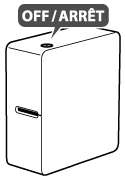
The printer is not equipped with a button or switch for enabling or disabling Bluetooth. Turn the printer off to turn off Bluetooth.
Introduction to Your LABELWORKS Printer
Setting Up the Printer
Using the Label Printer With Your Mobile Device via Bluetooth®
Using with a Windows® Computer via Bluetooth®
Using with a Windows® Computer via USB
Using with a Mac Computer
Applying Your Labels
Cleaning the Printer
Solving Problems
Appendix
Notices
Top > Using the Label Printer With Your Mobile Device via Bluetooth® > Turning Off Bluetooth® on the Printer
Turning Off Bluetooth® on the Printer
The printer is not equipped with a button or switch for enabling or disabling Bluetooth. Turn the printer off to turn off Bluetooth.