
Introduction to Your LABELWORKS Printer
Setting Up the Printer
Using the Label Printer With Your Mobile Device via Bluetooth®
Using with a Windows® Computer via Bluetooth®
Using with a Windows® Computer via USB
Using with a Mac Computer
Applying Your Labels
Cleaning the Printer
Solving Problems
Appendix
Notices
Top > Using with a Mac Computer > How to Connect using Bluetooth®
How to Connect using Bluetooth®
-
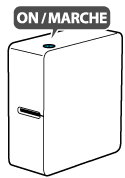
Turn on the printer.
-
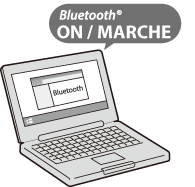
On your computer, turn on Bluetooth.
-
Start Label Editor and then select "LW-C650".
Even if your printer is LW-C650PX, select "LW-C650".
Introduction to Your LABELWORKS Printer
Setting Up the Printer
Using the Label Printer With Your Mobile Device via Bluetooth®
Using with a Windows® Computer via Bluetooth®
Using with a Windows® Computer via USB
Using with a Mac Computer
Applying Your Labels
Cleaning the Printer
Solving Problems
Appendix
Notices
Top > Using with a Mac Computer > How to Connect using Bluetooth®
How to Connect using Bluetooth®
-
Turn on the printer.
-
On your computer, turn on Bluetooth.
-
Start Label Editor and then select "LW-C650".
Even if your printer is LW-C650PX, select "LW-C650".