
Introduction to Your LABELWORKS Printer
Setting Up the Printer
Using the Label Printer With Your Mobile Device via Bluetooth®
Using with a Windows® Computer via Bluetooth®
Using with a Windows® Computer via USB
Using with a Mac Computer
Applying Your Labels
Cleaning the Printer
Solving Problems
Appendix
Notices
Top > Introduction to Your LABELWORKS Printer > Product Box Contents
Product Box Contents
Make sure your label printer box included all of these parts:
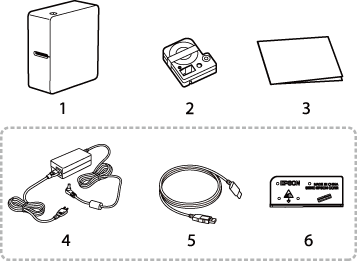
1. Printer
2. Tape cartridge
3. Documents
4. AC adapter
5. USB cable
6. Splitter
 Note Note
|
Introduction to Your LABELWORKS Printer
Setting Up the Printer
Using the Label Printer With Your Mobile Device via Bluetooth®
Using with a Windows® Computer via Bluetooth®
Using with a Windows® Computer via USB
Using with a Mac Computer
Applying Your Labels
Cleaning the Printer
Solving Problems
Appendix
Notices
Top > Introduction to Your LABELWORKS Printer > Product Box Contents
Product Box Contents
Make sure your label printer box included all of these parts:
1. Printer
2. Tape cartridge
3. Documents
4. AC adapter
5. USB cable
6. Splitter
Note
|