
Introduction to Your LABELWORKS Printer
Setting Up the Printer
Using the Label Printer With Your Mobile Device via Bluetooth®
Using with a Windows® Computer via Bluetooth®
Using with a Windows® Computer via USB
Using with a Mac Computer
Applying Your Labels
Cleaning the Printer
Solving Problems
Appendix
Notices
Top > Setting Up the Printer > Preparing the power supply
Preparing the power supply
This product operates on batteries or with the dedicated AC adapter.
 Note NotePlace this printer on a flat, stable surface that is larger than this printer. This printer will not operate properly if it is tilted or at an angle. |
Using with the AC adapter (AST1116Z1-1, AST1116Z2-1)
 WARNING WARNING
|
|
Note Do not unplug the AC adapter while the printer is in operation, otherwise printing may not be successful. |
-
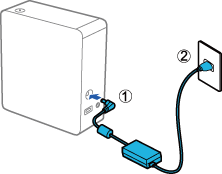
Connect the AC adapter to the printer, and plug the power cable into the outlet.
Using on batteries
The printer requires 6 AA alkaline batteries.
|
Note Do not insert or remove the batteries while the printer is in operation. |
-
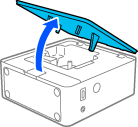
Open the tape cover.
-
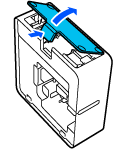
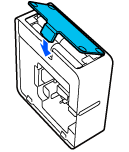
Press the tab and open the battery cover.
-
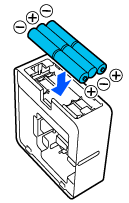
Insert the batteries with the + and – ends facing as shown.
-
Replace the battery cover.
Introduction to Your LABELWORKS Printer
Setting Up the Printer
Using the Label Printer With Your Mobile Device via Bluetooth®
Using with a Windows® Computer via Bluetooth®
Using with a Windows® Computer via USB
Using with a Mac Computer
Applying Your Labels
Cleaning the Printer
Solving Problems
Appendix
Notices
Top > Setting Up the Printer > Preparing the power supply
Preparing the power supply
This product operates on batteries or with the dedicated AC adapter.
|
Note Place this printer on a flat, stable surface that is larger than this printer. This printer will not operate properly if it is tilted or at an angle. |
Using with the AC adapter (AST1116Z1-1, AST1116Z2-1)
WARNING
|
|
Note Do not unplug the AC adapter while the printer is in operation, otherwise printing may not be successful. |
-
Connect the AC adapter to the printer, and plug the power cable into the outlet.
Using on batteries
The printer requires 6 AA alkaline batteries.
|
Note Do not insert or remove the batteries while the printer is in operation. |
-
Open the tape cover.
-
Press the tab and open the battery cover.
-
Insert the batteries with the + and – ends facing as shown.
-
Replace the battery cover.