
Introduction to Your LABELWORKS Printer
Setting Up the Printer
Using the Label Printer With Your Mobile Device via Bluetooth®
Using with a Windows® Computer via Bluetooth®
Using with a Windows® Computer via USB
Using with a Mac Computer
Applying Your Labels
Cleaning the Printer
Solving Problems
Appendix
Notices
Top > Solving Problems > Meanings of lamp
Meanings of lamp
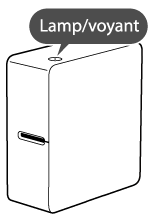
The lamp indicates printer statuses.
|
Lamp's condition
|
Printer status
|
|
|
Color
|
Pattern
|
|
|
--- |
--- |
Power OFF. |
|
White |
Flashing (once every 5 seconds) |
Bluetooth disabled. |
|
White |
Fading in and out |
Bluetooth enabled. |
|
White |
Lit |
Bluetooth connected. (Data in progress.) |
|
White |
Flashing quickly |
Performing operation such as printing or label cutting. |
|
White <=> Orange |
Flashing quickly |
Printer error. Check the message displayed on the connected computer or the mobile device. |
Related tasks

Introduction to Your LABELWORKS Printer
Setting Up the Printer
Using the Label Printer With Your Mobile Device via Bluetooth®
Using with a Windows® Computer via Bluetooth®
Using with a Windows® Computer via USB
Using with a Mac Computer
Applying Your Labels
Cleaning the Printer
Solving Problems
Appendix
Notices
Top > Solving Problems > Meanings of lamp
Meanings of lamp
The lamp indicates printer statuses.
|
Lamp's condition
|
Printer status
|
|
|
Color
|
Pattern
|
|
|
--- |
--- |
Power OFF. |
|
White |
Flashing (once every 5 seconds) |
Bluetooth disabled. |
|
White |
Fading in and out |
Bluetooth enabled. |
|
White |
Lit |
Bluetooth connected. (Data in progress.) |
|
White |
Flashing quickly |
Performing operation such as printing or label cutting. |
|
White <=> Orange |
Flashing quickly |
Printer error. Check the message displayed on the connected computer or the mobile device. |
Related tasks