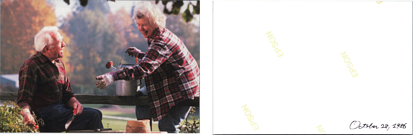
When scanning photos, you can also scan the back of the photos.
If text on the back of the photos is detected, the back sides of the photos are scanned. If the back sides are blank, the
back sides of the photos are not scanned.
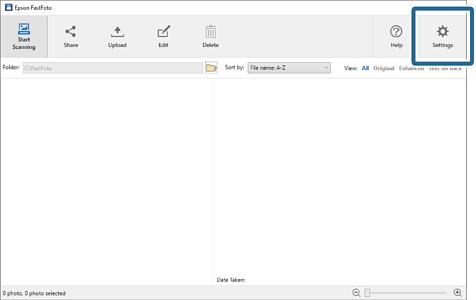
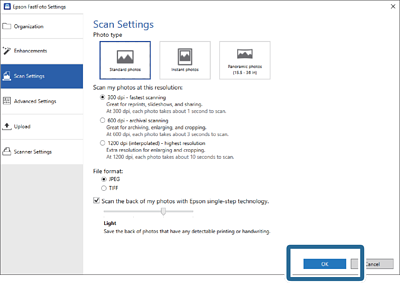
1Click Settings on the main screen.
The Epson FastFoto Settings screen is displayed.
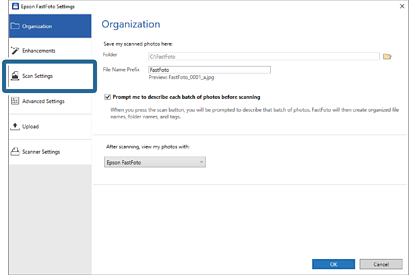
2Click the Scan Settings tab.
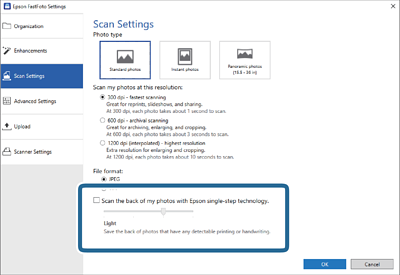
3Enable Scan the back of my photos with Epson single-step technology, and then adjust the detection level using the slider.
4Click OK to apply the settings.
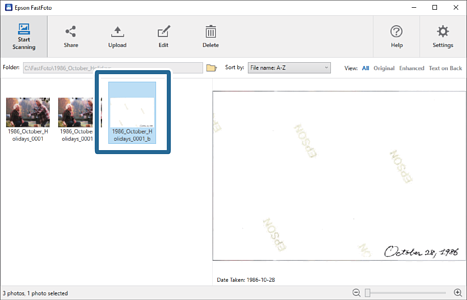
When scanning the photos, the back side images are saved as the name ended with "_b".
Note:
No color enhancement is applied to the back side image when scanning. If you want to enhance the color, select the image and
the click Edit on the main screen.


 Home
Home