Introduction
Basic Operations
Creating a New LabelInserting Objects in a LabelChanging Object SettingsSelecting Printer and TapeSetting Label LengthHow to Use the Data Creation WindowSaving Label FilesOpening Saved Label FilesCreating Labels for Label Editor Mobile
Creating a Variety of Labels
Creating Variable Length Labels in a Single Print (Mix-Length)Creating Labels for Equipment Tagging (Equipment Management)Creating Labels Using an Excel or Other Format FileCreating Cable LabelsPrinting Labels in Label CatalogPrinting the Same Text Repeatedly Adding an Automatic Serialization Object in LabelsAdding a Barcode or QR CodeCreating a Large Label by Printing One Image on Multiple LabelsTransferring Label Files to Printer (Data Transfer Tool)
Printing
Changing Preference Settings
Appendix
Top > Basic Operations > Saving Label Files
Saving Label Files
-
Click on the tool bar, or select Save from the File menu.
-
Save the file by specifying a location to save and the file name.
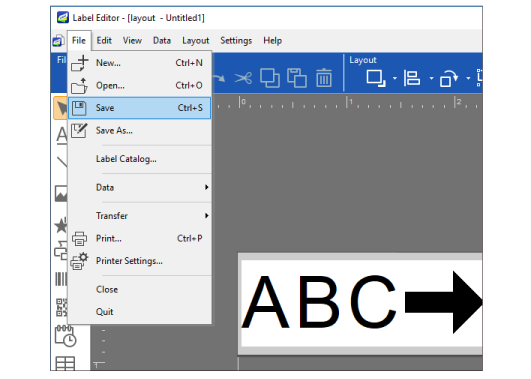
The file is saved under the specified name with ".leb" extension.
Introduction
Basic Operations
Creating a New LabelInserting Objects in a LabelChanging Object SettingsSelecting Printer and TapeSetting Label LengthHow to Use the Data Creation WindowSaving Label FilesOpening Saved Label FilesCreating Labels for Label Editor Mobile
Creating a Variety of Labels
Creating Variable Length Labels in a Single Print (Mix-Length)Creating Labels for Equipment Tagging (Equipment Management)Creating Labels Using an Excel or Other Format FileCreating Cable LabelsPrinting Labels in Label CatalogPrinting the Same Text Repeatedly Adding an Automatic Serialization Object in LabelsAdding a Barcode or QR CodeCreating a Large Label by Printing One Image on Multiple LabelsTransferring Label Files to Printer (Data Transfer Tool)
Printing
Changing Preference Settings
Appendix
Top > Basic Operations > Saving Label Files
Saving Label Files
-
Click on the tool bar, or select Save from the File menu.
-
Save the file by specifying a location to save and the file name.
The file is saved under the specified name with ".leb" extension.