
Before Using the Printer
Part Names
Setup of the Printer
Placing the PrinterChanging the Paper WidthConnecting CablesUsing the Power Switch CoverConnecting Smart Devices
Setup of the Tablet
Tablets that Can be Mounted to the PrinterOutline Drawing for Mounting TabletsPreparation for SetupAttaching the Attachment to the Front TabletRemoving the Bottom CoverPreparing for Mounting the Front TabletMounting the Rear DisplayMounting the DM-D70Attaching the Bottom CoverMounting/Dismounting the Front TabletMounting/Dismounting the Rear DisplayHow to Attach the AC AdapterHow to Remove the AttachmentHow to Attach the Spare Adhesive Strips to the Attachment
Basic Operations
Turning the Power On/OffInstalling or Replacing the Roll PaperHow to Secure the PrinterHow to Hold the PrinterTransporting the Printer
Cleaning
Troubleshooting
Meanings of LED IndicationsPrintout is FaintCannot PrintThe Attachment is Pasted in the Wrong WayThe Attachment is BrokenWhen the Roll Paper JamsWhen Sending for Repair
Appendix
Top > Part Names > Rear
Rear
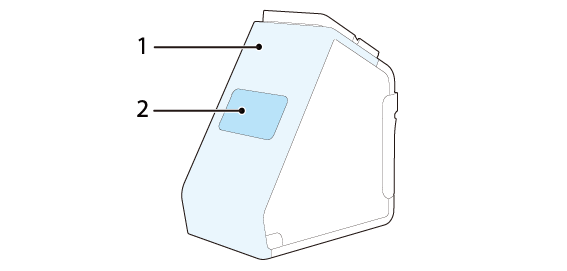
|
1 |
Rear cover |
Remove this cover when connecting or disconnecting a cable of the front tablet. |
|
2 |
Rear display section cover |
Remove this cover when mounting a rear display or when removing the rear cover. |
Before Using the Printer
Part Names
Setup of the Printer
Placing the PrinterChanging the Paper WidthConnecting CablesUsing the Power Switch CoverConnecting Smart Devices
Setup of the Tablet
Tablets that Can be Mounted to the PrinterOutline Drawing for Mounting TabletsPreparation for SetupAttaching the Attachment to the Front TabletRemoving the Bottom CoverPreparing for Mounting the Front TabletMounting the Rear DisplayMounting the DM-D70Attaching the Bottom CoverMounting/Dismounting the Front TabletMounting/Dismounting the Rear DisplayHow to Attach the AC AdapterHow to Remove the AttachmentHow to Attach the Spare Adhesive Strips to the Attachment
Basic Operations
Turning the Power On/OffInstalling or Replacing the Roll PaperHow to Secure the PrinterHow to Hold the PrinterTransporting the Printer
Cleaning
Troubleshooting
Meanings of LED IndicationsPrintout is FaintCannot PrintThe Attachment is Pasted in the Wrong WayThe Attachment is BrokenWhen the Roll Paper JamsWhen Sending for Repair
Appendix
Top > Part Names > Rear
Rear
|
1 |
Rear cover |
Remove this cover when connecting or disconnecting a cable of the front tablet. |
|
2 |
Rear display section cover |
Remove this cover when mounting a rear display or when removing the rear cover. |