
Before Using the Printer
Part Names
Setup of the Printer
Setup of the Tablet
Basic Operations
Cleaning
Troubleshooting
Appendix
Top > Setup of the Tablet > Removing the Bottom Cover
Removing the Bottom Cover
Follow the procedure below to remove the bottom cover.
-
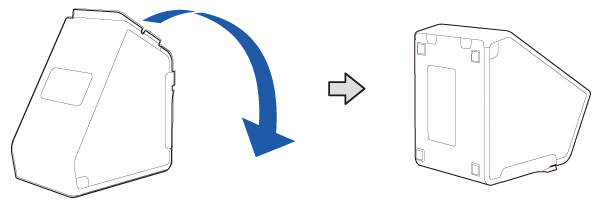
Lay the printer down.
-
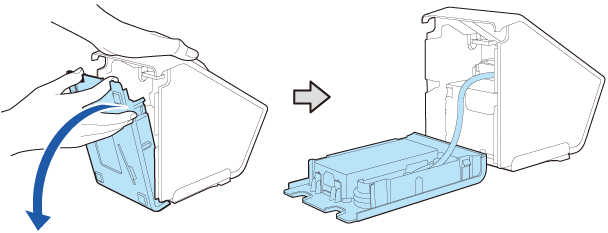
Put your fingers on the cutouts and open the bottom cover to remove it.
-
Take care not to push the AC adapter. Doing so will cause the AC adapter to come off.
 How to Attach the AC Adapter
If there is a protective sheet on the AC adapter, make sure to remove it. The sheet is for protecting the AC adapter during transportation.
-
Grasp the plug and pull it out to disconnect the DC cable.
 Note:
Note: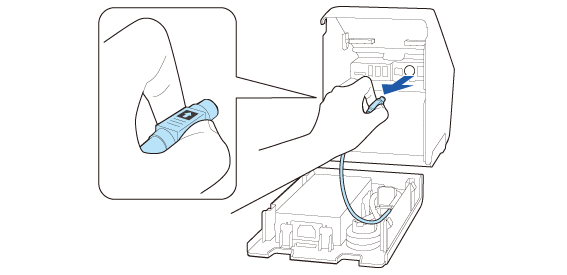
Before Using the Printer
Part Names
Setup of the Printer
Setup of the Tablet
Basic Operations
Cleaning
Troubleshooting
Appendix
Top > Setup of the Tablet > Removing the Bottom Cover
Removing the Bottom Cover
Follow the procedure below to remove the bottom cover.
-
Lay the printer down.
-
Put your fingers on the cutouts and open the bottom cover to remove it.
-
Take care not to push the AC adapter. Doing so will cause the AC adapter to come off.
How to Attach the AC Adapter
If there is a protective sheet on the AC adapter, make sure to remove it. The sheet is for protecting the AC adapter during transportation.
-
Grasp the plug and pull it out to disconnect the DC cable.
Note: