Language
Epson

TM-m30II-S

User's Manual

Epson

TM-m30II-S

User's Manual

Troubleshoot
Troubleshooting

Before Using the Printer

Important Safety InformationProduct Information PageChecking Items Included with the Printer

Part Names

FrontRearBottom

Setup of the Printer

Placing the PrinterChanging the Paper WidthConnecting CablesUsing the Power Switch CoverConnecting Smart Devices

Setup of the Tablet

Tablets that Can be Mounted to the PrinterOutline Drawing for Mounting TabletsPreparation for SetupAttaching the Attachment to the Front TabletRemoving the Bottom CoverPreparing for Mounting the Front TabletMounting the Rear DisplayMounting the DM-D70Attaching the Bottom CoverMounting/Dismounting the Front TabletMounting/Dismounting the Rear DisplayHow to Attach the AC AdapterHow to Remove the AttachmentHow to Attach the Spare Adhesive Strips to the Attachment

Basic Operations

Turning the Power On/OffInstalling or Replacing the Roll PaperHow to Secure the PrinterHow to Hold the PrinterTransporting the Printer

Cleaning

Cleaning the Printer CaseCleaning the Thermal Head and the Platen Roller

Troubleshooting

Meanings of LED IndicationsPrintout is FaintCannot PrintThe Attachment is Pasted in the Wrong WayThe Attachment is BrokenWhen the Roll Paper JamsWhen Sending for Repair

Appendix

SpecificationsOptional KitsRestriction of UseCAUTIONSTrademarks

Top > Setup of the Printer > Changing the Paper Width

Changing the Paper Width

You can change the paper width from 80 to 58 mm by installing the included 58-mm width roll paper guides. Follow the steps below to change the paper width.

CAUTION:

Turn off the printer when installing the roll paper guides.

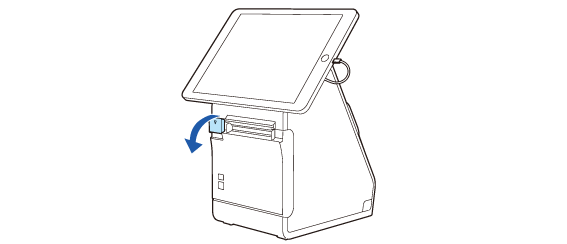
  1. Open the roll paper cover.

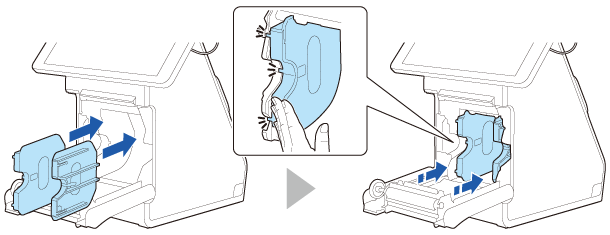
  2. Align the three projections on the roll paper guides with the rectangular holes in the printer, and then push the guides inward.

  3. Set the paper width in software setting mode. For details, see the Technical Reference Guide.
CAUTION:
  • If you remove the roll paper guide to use 80 mm width paper after changing the paper width setting, make sure to change the setting again. For details, see the Technical Reference Guide.
  • After using the printer for an extended period at 58 mm, do not return to 80 mm. Parts of the print head that do not normally touch the paper may be damaged by the platen roller, and the autocutter may wear out.

  • Back
  • Top
  • Next
Troubleshoot
Troubleshooting

Before Using the Printer

Important Safety InformationProduct Information PageChecking Items Included with the Printer

Part Names

FrontRearBottom

Setup of the Printer

Placing the PrinterChanging the Paper WidthConnecting CablesUsing the Power Switch CoverConnecting Smart Devices

Setup of the Tablet

Tablets that Can be Mounted to the PrinterOutline Drawing for Mounting TabletsPreparation for SetupAttaching the Attachment to the Front TabletRemoving the Bottom CoverPreparing for Mounting the Front TabletMounting the Rear DisplayMounting the DM-D70Attaching the Bottom CoverMounting/Dismounting the Front TabletMounting/Dismounting the Rear DisplayHow to Attach the AC AdapterHow to Remove the AttachmentHow to Attach the Spare Adhesive Strips to the Attachment

Basic Operations

Turning the Power On/OffInstalling or Replacing the Roll PaperHow to Secure the PrinterHow to Hold the PrinterTransporting the Printer

Cleaning

Cleaning the Printer CaseCleaning the Thermal Head and the Platen Roller

Troubleshooting

Meanings of LED IndicationsPrintout is FaintCannot PrintThe Attachment is Pasted in the Wrong WayThe Attachment is BrokenWhen the Roll Paper JamsWhen Sending for Repair

Appendix

SpecificationsOptional KitsRestriction of UseCAUTIONSTrademarks

Top > Setup of the Printer > Changing the Paper Width

Changing the Paper Width

You can change the paper width from 80 to 58 mm by installing the included 58-mm width roll paper guides. Follow the steps below to change the paper width.

CAUTION:

Turn off the printer when installing the roll paper guides.

  1. Open the roll paper cover.

  2. Align the three projections on the roll paper guides with the rectangular holes in the printer, and then push the guides inward.

  3. Set the paper width in software setting mode. For details, see the Technical Reference Guide.

CAUTION:
  • If you remove the roll paper guide to use 80 mm width paper after changing the paper width setting, make sure to change the setting again. For details, see the Technical Reference Guide.

  • After using the printer for an extended period at 58 mm, do not return to 80 mm. Parts of the print head that do not normally touch the paper may be damaged by the platen roller, and the autocutter may wear out.

  • Back
  • Top
  • Next

©Seiko Epson Corporation 2020 - 2021 (M00130602 EN)

Language selection

  • English
  • Français
  • Deutsch
  • Nederlands
  • Italiano
  • Español
  • Português
  • Türkçe
  • Ελληνικά
  • Slovenščina
  • Hrvatski
  • Македонски
  • Srpski
  • Dansk
  • Suomi
  • Norsk
  • Svenska
  • Polski
  • Česky
  • Magyar
  • Slovenčina
  • Română
  • Български
  • Latviešu
  • Lietuvių
  • Eesti
  • العربية
  • 日本語