
Before Using the Printer
Part Names
Setup of the Printer
Setup of the Tablet
Basic Operations
Cleaning
Troubleshooting
Appendix
Top > Setup of the Tablet > Mounting/Dismounting the Rear Display
Mounting/Dismounting the Rear Display
Follow the procedure below to mount or dismount the rear display.
Mounting the Rear Display
-
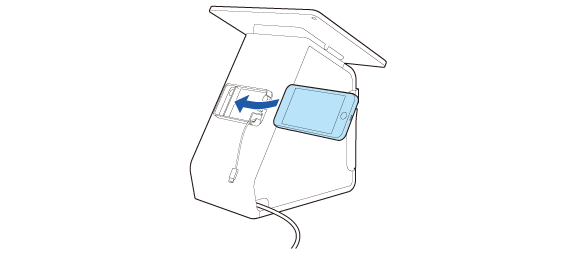
Attach the display from the side of the rear display fixture.
-
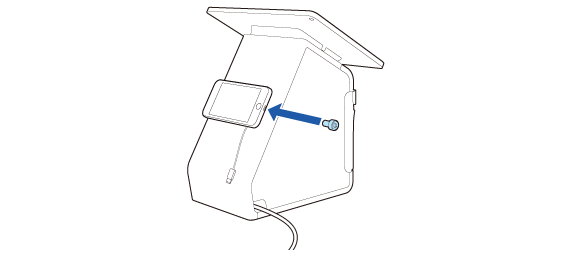
Secure it with the included screw.
-
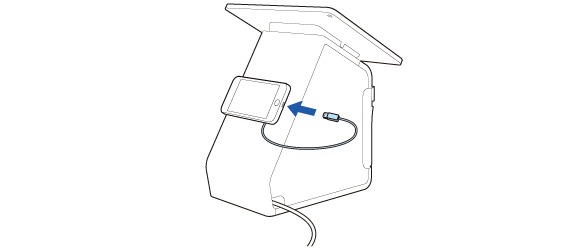
Connect the cable to the display.
Dismounting the Rear Display
-
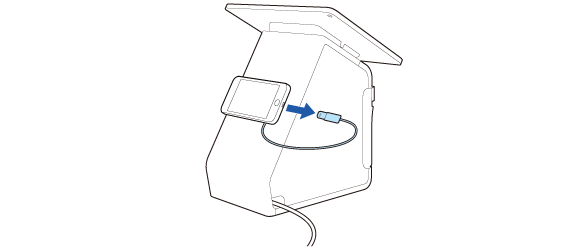
Disconnect the cable from the display.
-
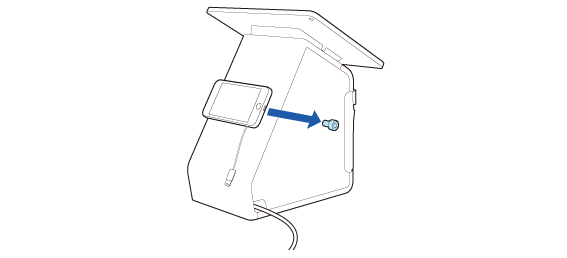
Remove the screw and then dismount the rear display.
Store the screw and be careful not to lose it.
Before Using the Printer
Part Names
Setup of the Printer
Setup of the Tablet
Basic Operations
Cleaning
Troubleshooting
Appendix
Top > Setup of the Tablet > Mounting/Dismounting the Rear Display
Mounting/Dismounting the Rear Display
Follow the procedure below to mount or dismount the rear display.
Mounting the Rear Display
-
Attach the display from the side of the rear display fixture.
-
Secure it with the included screw.
-
Connect the cable to the display.
Dismounting the Rear Display
-
Disconnect the cable from the display.
-
Remove the screw and then dismount the rear display.
Store the screw and be careful not to lose it.