Registering OrderController Easy Print System as an External Application
You cannot connect SureLab OrderController directly to Production Flow.
By registering OrderController Easy Print System as external application of SureLab OrderController, you can select presets registered in SureLab OrderController from Production Flow.
-
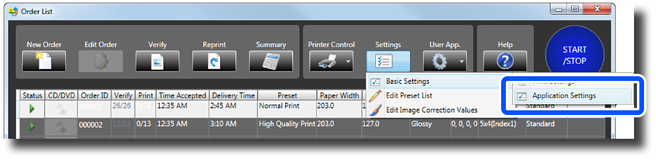
Click Settings on the Order List screen, and then click Basic Settings > Application Settings.
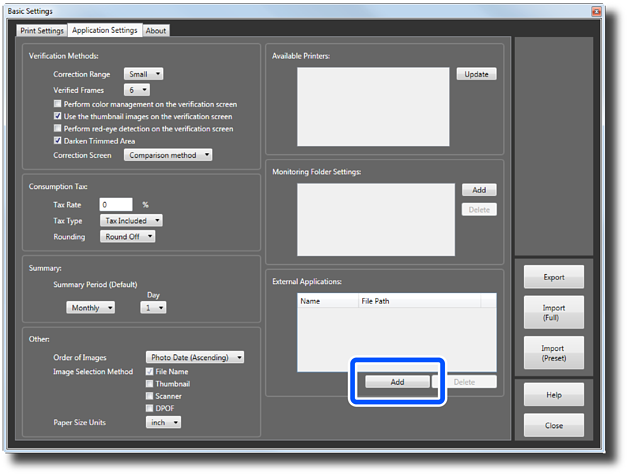
The Basic Settings screen is displayed.
-
Click External Applications > Add.
 Note:
Note:To delete an application, select the application you want to delete, and then click Delete. Click Yes on the confirmation screen to delete.
-
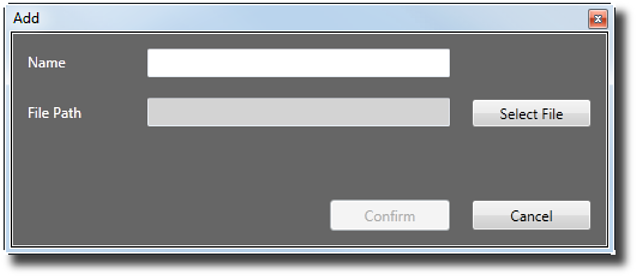
Enter a name in Name and select %ProgramFiles%\EPSON\EPSON SureLab OrderController v3 > DFEWatcher.exe in File Path.
Click Select File to display the Open screen, where you can browse and select files. You can enter up to 16 characters for the name.
-
Click Confirm.
OrderController Easy Print System is added to the list of external applications and can be started from User App.
Note:You can register up to 10 external applications.
-
Click Close.
A screen is displayed confirming that the settings have been finalized.
-
Click Yes to close the Basic Settings screen.
You are returned to the Order List screen.
Note:Click No to close the Basic Settings screen without changing any settings.
-
Re-start SureLab OrderController.
This completes this procedure.
