What is Epson Craft Studio?
Composition of Epson Craft Studio
Epson Craft Studio Operation Workflow
Making Print Settings (Print Software for Each Printer)
Making Print Settings with Print Hub
Step 1. Start Print Hub
Step 2. Make print settings for the printer
Adding Print Settings
Changing the Settings for Print Settings
Re-naming Print Settings
Deleting Print Settings
Step 3. Reflect the print settings in Production Flow
Settings
Making Print Settings in OrderController Easy Print System
Step 1. Set up SureLab OrderController
Step 1-1. Start up
Step 1-2. Make system settings
Setting the Status when an Order is Received
Registering OrderController Easy Print System as an External Application
Setting a Re-order
Setting How Long to Save the Order
Step 2. Set up OrderController Easy Print System
Step 2-1. Start up
Step 2-2. Set up a monitoring folder
Step 3: Make print settings for the printer
Changing Registered Presets/Printers for Print Settings
Step 4. Reflect the print settings in Production Flow
Making Print Settings with Garment Creator / Garment Creator2
Making Print Settings with Epson Edge Print
Registering Items (Craft Admin)
Required Settings
Step 1. Start Craft Admin
Step 2. Register a new item
Making Settings for the Item Name
Setting the Unit Price for Items
Making Settings for the Item Workflow Type
Making Settings for the Print Software
Set the print size
Making Settings for the Item Image
Making Settings for the Item Description
Making Settings for the Design Template
Register items
Step 3. Publish the item on the order screen
Step 4. Check registration information from Craft Designer
Managing Multiple Items
Copying Items
Changing the Item Display Order
Deleting Unnecessary Items
Optional Settings
Setting item details
Changing the Design Editing Area
Making Settings for the Work Memo
Sorting into Categories
Setting Barcodes
Setting Automatic Printing Information
Making System Settings for the Order Screen
Registering/Editing a Category
Registering a Category
Adding Items to Category
Deleting Items from Category
Changing the Display Order of Items in Category
Editing a Category
Making Settings for the Home Screen Image
Setting Units
Making Display Settings for the Order Screen
Setting Receipt Printing Information
Setting a Custom Template
Making Settings for Messages
Sharing Settings Across Multiple In-store iPads
Importing Settings
Exporting Settings
Loading Content Information
Troubleshooting & Tips
I Want to Check Information About the App
Using the iPads in Portrait Orientation
Resetting the Default Settings
Submitting an Order (Craft Designer)
Default Settings
Step 1. Start Craft Designer
Step 2. Log in to Epson Global ID
Step 3. Use the Admin screen to setup the in-store iPads
Step 4. Set the display language
Ordering Items
Step 1. Select an item
Step 2. Select a design
Step 3. Select a photo
About Date/Border Settings
Paper that Supports Date/Border Printing
Step 4. Check the result
Editing Designs
Changing the Background
Changing the Designs
Adding Stamps
Changing the Color of the Stamp
Editing Text
Sorting Pages
Correcting the Colors in a Photo
Step 5. Confirm order
Cart Details Screen
Setting Up Full-Screen Apps and Guided Access
Setting Up Full-Screen Apps
Initial Setup for Guided Access
Enabling Guided Access from the App
Disabling Guided Access from the App
An Error Screen is Displayed
Error Codes and Solutions
Re-uploading an Order
Deleting Orders from Production Flow
Reprinting Receipts
Problems Operating the Customer's Smart Device
Web App is Not Displayed when 2D Barcode is Scanned
Cannot Access Images (Android Device)
Cannot Select Multiple Images (Android Device)
Adding Images Fails (Sending Does Not Start)
Printing an Order
Step 1. Check the order using the order number
Step 2. Print the order
Printing Held Orders (Print Hub)
Order List Screen Details
Printing Held Orders (SureLab OrderController)
Recommended System Requirements
Craft Admin
Craft Designer
Print Hub
OrderController Easy Print System
Stop Using Epson Craft Studio
Epson DC Agent for ECSP
Epson ES Agent for ESCP
Epson PJ Agent for ECSP
Print Software for Each Printer
Craft Admin/Craft Designer
License Agreements for Open Source Software
Trademarks
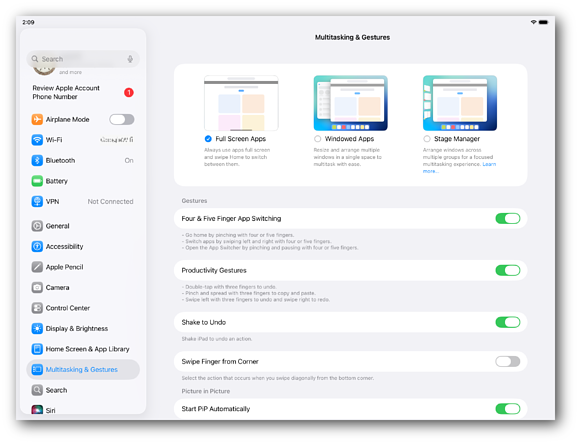
For customers using iPad OS Ver.26.0 and later, you need to configure settings to always use apps in full-screen mode.
Tap Settings on the iPad to open the Settings screen.
Select Multitasking & Gestures > Full-Screen Apps.
This completes the full-screen app setup.